Zipic is a powerful, native image compression application designed for both Mac and Windows, enabling users to save space and maintain image quality with speed and flexibility. It offers comprehensive tools for compressing, converting, and resizing images directly on your device, ensuring privacy as no images are ever uploaded to the cloud.
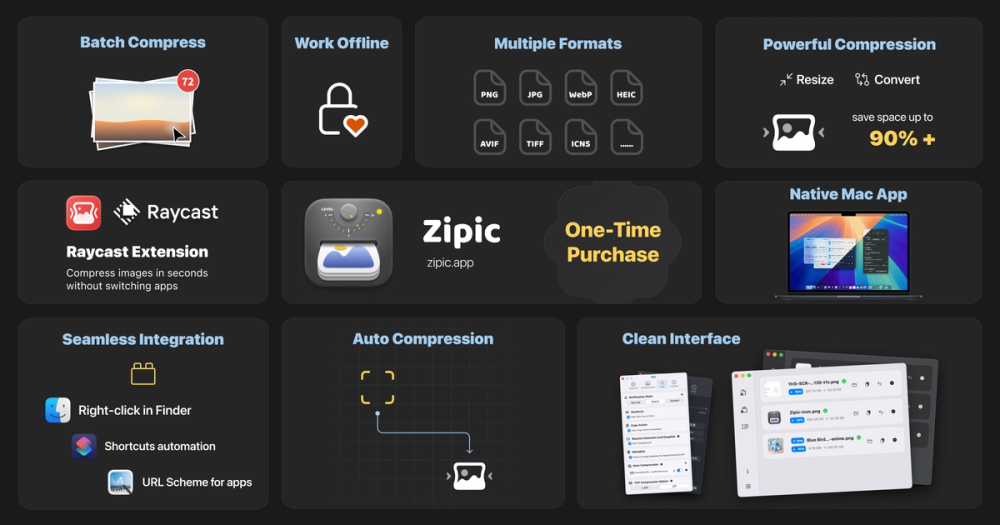
The application supports a wide array of formats, including JPEG, PNG, WebP, HEIC, AVIF, JPEG XL, TIFF, GIF, PDF, SVG, and APNG, with specific support for ICNS on macOS and ICO on Windows. This broad compatibility makes it an indispensable tool for various professionals, including developers, designers, bloggers, and photographers.
Key features of Zipic include:
- Batch Compression & Format Conversion: Effortlessly process single files or entire folders. Achieve high compression ratios with minimal perceptible quality loss, transforming images instantly. The seamless operation is enhanced by drag-and-drop functionality, hotkeys, menu bar access, and folder monitoring.
- Near-Lossless Quality: Zipic employs advanced compression algorithms to significantly reduce file sizes while preserving the original resolution and visual fidelity. Users can compare original and compressed images side-by-side to witness the impressive results, often achieving substantial reductions (e.g., 403KB to 108KB) without noticeable degradation.
- Custom Presets & Control: Gain perfect control over your compression workflows by creating custom presets tailored for different scenarios and quality levels. The application also provides ready-to-use default settings and allows for one-click switching between presets, adapting instantly to any project's requirements.
- Native Performance & On-Device Processing: Built as native applications for macOS and Windows, Zipic delivers lightning-fast performance, handling massive batches with ease. All image processing occurs locally on your device, guaranteeing privacy and allowing for offline use. The lightweight design ensures a minimal system footprint, and the app automatically adapts to your system's theme preferences.
- Advanced Automation & Integration: For professionals seeking enhanced workflows, Zipic offers robust automation capabilities. Pro features include Notch Drop for instant compression by dragging to the screen notch, clipboard auto-compress, and intelligent folder monitoring with custom rules. It integrates seamlessly with existing tools through the
zipic CLI, Apple Shortcuts, Raycast extension, URL Scheme automation, and Finder quick actions, making it highly adaptable to complex professional environments.
Zipic operates on a "Pay Once, Updates Always" model, offering a 7-day full Pro trial, followed by a free tier with 25 daily compressions and basic features. Users can upgrade to a Pro license for unlimited compressions and access to all advanced features across multiple devices. This combination of powerful features, privacy-focused local processing, and flexible pricing makes Zipic an essential tool for anyone needing efficient and high-quality image optimization.