Overview
Text Logo is a browser-based editor for creating custom text logos, wordmark logos, and typography logos. It is made for founders, creators, designers, freelancers, and small businesses that want a polished brand mark without complex design software. Start with a name or short phrase, explore typography visually, refine the composition, and export a practical logo asset for a website, social profile, presentation, or printed material.
Key Features
Per-character typography
Customize letters individually instead of treating the whole name as one fixed block. Choose from Google Fonts, adjust colors and size, and change rotation or position for separate characters. This makes it easier to emphasize a letter, create a distinctive rhythm, or build a balanced wordmark that feels specific to your brand.
Canvas and spacing controls
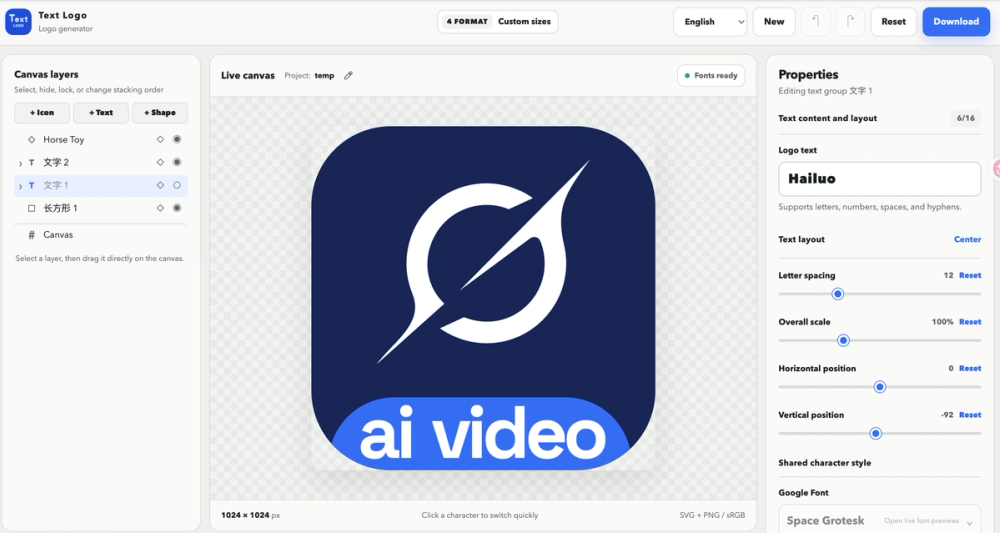
Set custom canvas dimensions and refine the relationship between letters with adjustable letter spacing. Solid and gradient backgrounds help you preview different presentation styles. Canvas size, spacing, positioning, and alignment controls support compact marks, wide wordmarks, social graphics, and other brand assets from the same starting idea.
Icons, shapes, and images
Add icons and geometric shapes when they support the concept, and upload an image for a more personal or illustrative direction. Supporting elements can be positioned alongside the lettering while the text remains the central identity.
Visual layer panel
Manage every canvas element through a clear layer panel. Select, reorder, hide, lock, duplicate, and position letters, shapes, icons, and images. This is useful when a composition becomes more detailed because you can control overlapping objects without hunting through the design.
Live editing, templates, and local projects
Changes appear on the canvas as you work, so you can compare fonts, colors, spacing, and layouts quickly. Built-in templates provide starting points for exploring typography directions. Locally saved projects let you return to work and reuse ideas without rebuilding a composition from scratch.
Export formats
Export a finished logo as SVG, PNG, WebP, or ICO at the dimensions you need, or package multiple file types and sizes in one download. SVG is useful for scalable brand work, while PNG and WebP are convenient for websites and digital content. ICO supports favicon-style use cases, so one design can move smoothly from exploration to publishing.
Who It Is For
Founders can explore a product name and prepare consistent assets for a landing page. Creators can make a recognizable mark for a channel, newsletter, or portfolio. Freelancers can test typography directions for a client discussion. Small businesses can create a clear name-based identity and export files for web profiles, documents, and marketing materials. Designers and developers can also use Text Logo to create an initial typographic direction before refining it in a larger workflow.
Because the editor runs in the browser, it is easy to open when an idea appears and continue experimenting without installing a complex application. The focused controls keep the process approachable while still offering room for careful visual refinement.
A Simple Workflow
- Enter the name, word, or short phrase you want to explore.
- Choose a font and adjust colors, size, spacing, rotation, and position.
- Add an icon, shape, background, or image when it supports the idea.
- Use the layer panel to reorder, hide, lock, duplicate, and align elements.
- Adjust the canvas dimensions and review the design in the live editor.
Text Logo is available at https://textlogo.app for creating a custom wordmark in the browser.