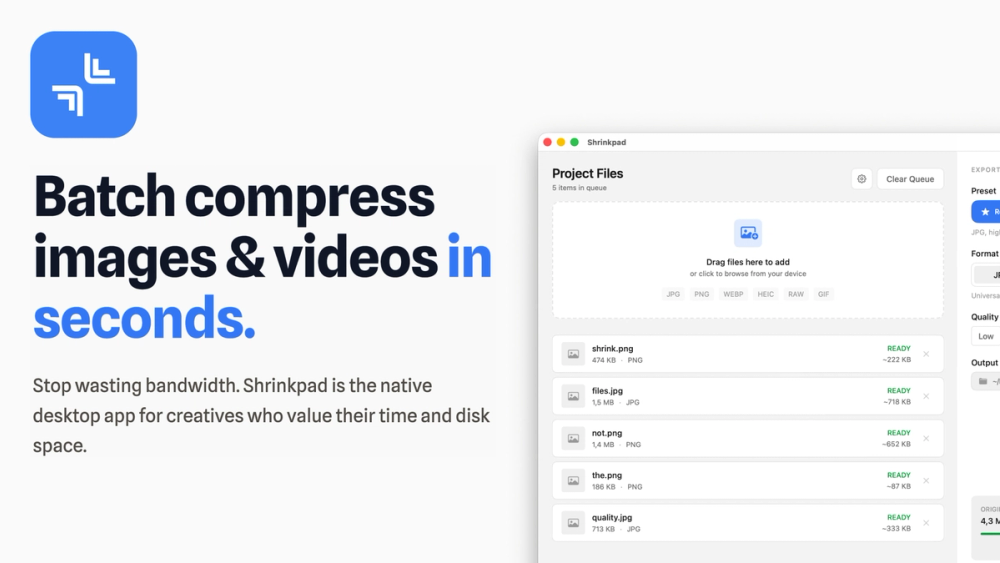
Shrinkpad is a powerful, native macOS application designed for batch compressing images and videos, enabling creatives and professionals to optimize their digital assets efficiently. It stands out by processing thousands of files locally on your machine, ensuring complete privacy and eliminating the need for cloud uploads.
Key features include:
- Intelligent Compression: Shrinkpad automatically analyzes the visual complexity of your media to apply optimal compression ratios without introducing artifacts, saving you from manual setting adjustments. This results in significant reductions in app bundle sizes and website load times, with many users experiencing faster Largest Contentful Paint (LCP) scores.
- Unlimited Batch Processing: Unlike web-based tools, Shrinkpad is built to handle massive queues, allowing you to process thousands of images and videos in a single batch without crashing. This capability is crucial for large projects and high-volume workflows.
- Folder Mode for Bulk Import: Streamline your workflow by simply dragging and dropping an entire folder onto Shrinkpad. The app intelligently detects and adds all supported image and video files within the folder, including those in subfolders, to your batch list. It supports over 30 image formats, including various RAW camera formats (CR2, NEF, ARW, DNG, etc.), and major video formats like MP4, MOV, and MKV.
- Time-Saving Automation: Eliminate tedious manual exports from design software like Figma or Photoshop. Export all assets at higher resolutions (e.g., 2x/4x) and let Shrinkpad handle the bulk optimization, renaming, and metadata stripping.
- Blazing Fast Performance: Optimized for Apple Silicon (M1, M2, M3, M4) and fully compatible with Intel Macs running macOS 13 Ventura or newer, Shrinkpad leverages multi-threaded compression to process files at lightning speed.
- Comprehensive Format Support: Beyond common formats like JPG, PNG, WebP, and MP4, Shrinkpad offers extensive support for HEIC, TIFF, GIF, BMP, MOV, M4V, AVI, MKV, and a wide array of RAW formats from Canon, Nikon, Sony, and more.
- Privacy-First Design: All compression and processing occur entirely on your local machine. Your sensitive images and videos never leave your device, ensuring maximum security and confidentiality.
Shrinkpad offers a free tier for casual use (up to 10 files per batch) and paid Personal and Team licenses for unlimited batch processing, full format support, and advanced controls. It's a one-time purchase, providing a powerful, permanent solution for asset optimization.