A privacy screen for your Mac.
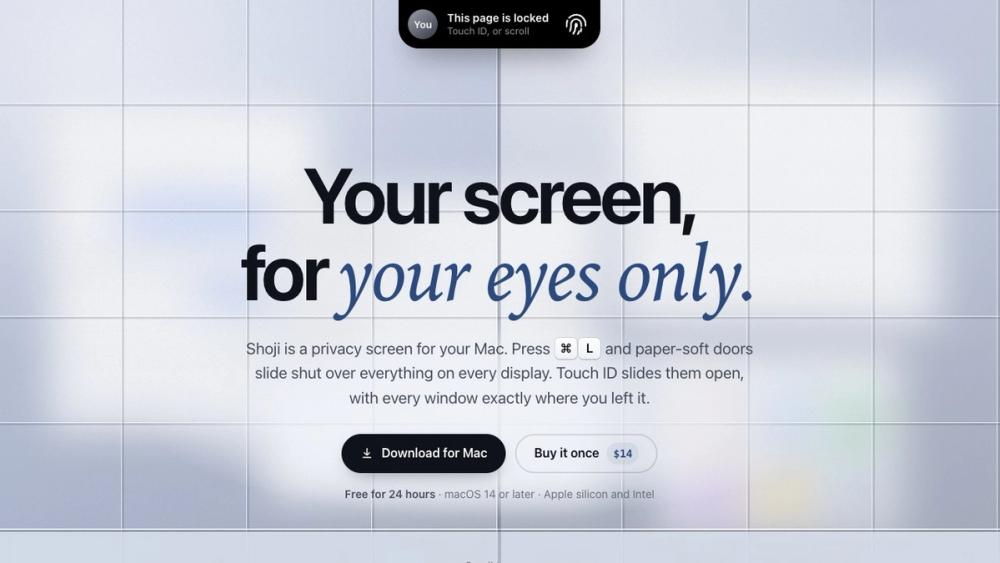
Press Command-L and a soft screen covers every display. Touch ID opens it again with every window where you left it. $14 once.
About Shoji
Shoji is a privacy screen for your Mac. Press Command-L and a soft screen slides shut over everything on every display; Touch ID slides it open again with every window exactly where you left it.
Focus Blur keeps only the window you are using sharp, so you can work in a cafe, on a plane or in a shared room without people reading over your shoulder. You can blur one app, everything but the window in use, or the whole Mac.
Shoji needs no macOS permissions, no account and has no analytics. $14 once, with a free 24-hour trial.
Highlights
- Lock Mac (Command-L): every display and every app behind one screen. Touch ID or your Mac password opens it.
- Blur Screen: one shortcut softens everything at once, no password needed, and Escape brings it straight back.
- Focus Blur: only the window you are using stays sharp, and the blur follows you as you switch.
- Private Apps: Messages, Slack and Mail stay blurred unless you are the one using them.
- App Lock (Option-Command-L): lock just the app in front before you hand your Mac over.
- After the time you choose, Shoji also turns on the real macOS lock.
- Plug in a monitor while locked and it is covered the moment it wakes.
- macOS 14 or later, Apple silicon and Intel.
Details
- Price: $14 one-time, free 24-hour trial
- Platform: macOS
- Website: https://shoji.everydaymactools.com/
- Made by: Everyday Mac Tools