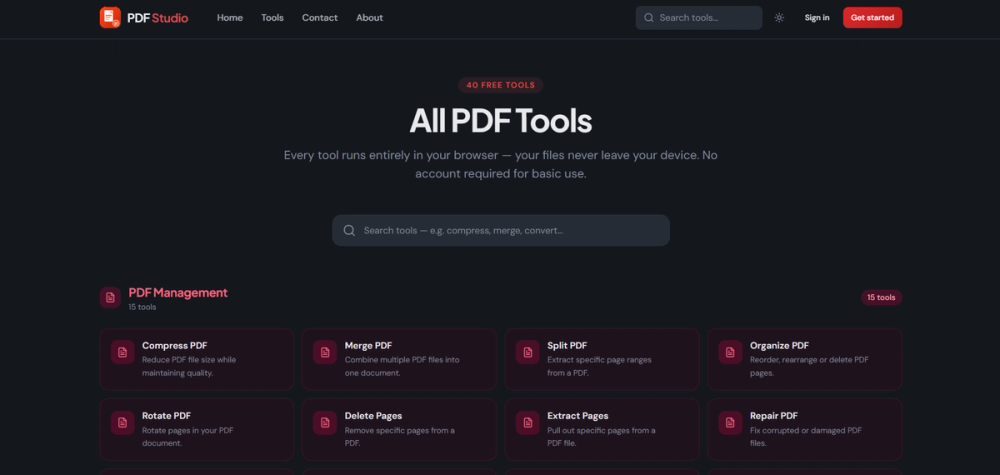
PDF Studio offers a robust and entirely free suite of 40 online tools designed for comprehensive PDF document management directly within your web browser. This innovative platform eliminates the traditional hurdles associated with PDF manipulation, such as the need for software installations, mandatory user registrations, or the privacy concerns of uploading sensitive documents to external servers. By operating client-side, PDF Studio ensures that all your document processing happens securely on your device, providing unparalleled privacy and peace of mind.
The extensive collection of tools covers a wide spectrum of PDF functionalities, catering to both basic and advanced user needs. Key features include:
- Merge PDFs: Effortlessly combine multiple PDF files into a single, cohesive document. This is invaluable for consolidating various reports, chapters of a book, or different sections of a presentation into one organized file, streamlining document management and sharing.
- Split PDFs: Precisely divide large PDF documents into smaller, more manageable files. Users can extract specific pages, page ranges, or separate individual documents from a larger compilation, making it easier to distribute relevant sections without sharing the entire file.
- Compress PDFs: Significantly reduce the file size of your PDF documents without compromising visual quality. This feature is crucial for optimizing files for email attachments, faster web uploads, or saving storage space, ensuring efficient document handling.
- Convert PDFs: Facilitate seamless interoperability by converting PDFs to and from a multitude of popular formats. Whether you need to transform a PDF into an editable Word document, an analytical Excel spreadsheet, a dynamic PowerPoint presentation, or image formats like JPG and PNG, PDF Studio provides accurate and reliable conversions. Conversely, it can also convert these formats back into PDFs.
- Sign PDFs: Electronically sign your documents directly within the browser, offering a quick and legally compliant method for approving contracts, agreements, and official forms. This digital signing capability enhances workflow efficiency and reduces reliance on physical paperwork.
- Edit PDFs: Perform essential editing tasks on your PDF documents. Users can add text, insert images, draw shapes, highlight important sections, and annotate documents for review or collaboration. This allows for quick modifications without needing complex desktop software.
PDF Studio is built with user convenience and security at its core. Its browser-based nature means it's accessible from any operating system (Windows, macOS, Linux) and any device (desktop, laptop, tablet, smartphone) that has a modern web browser. The "no uploads, no sign-up" policy is a significant differentiator, ensuring that your confidential information never leaves your local machine, thereby mitigating data breach risks. This makes it an ideal solution for individuals and businesses alike who prioritize data privacy and seek efficient, free tools for their daily PDF tasks. From students compiling research papers to professionals managing business documents, PDF Studio offers a versatile, secure, and cost-effective alternative to premium PDF software. Its intuitive interface ensures that even novice users can navigate and utilize its powerful features with ease, making complex PDF operations simple and accessible for everyone.