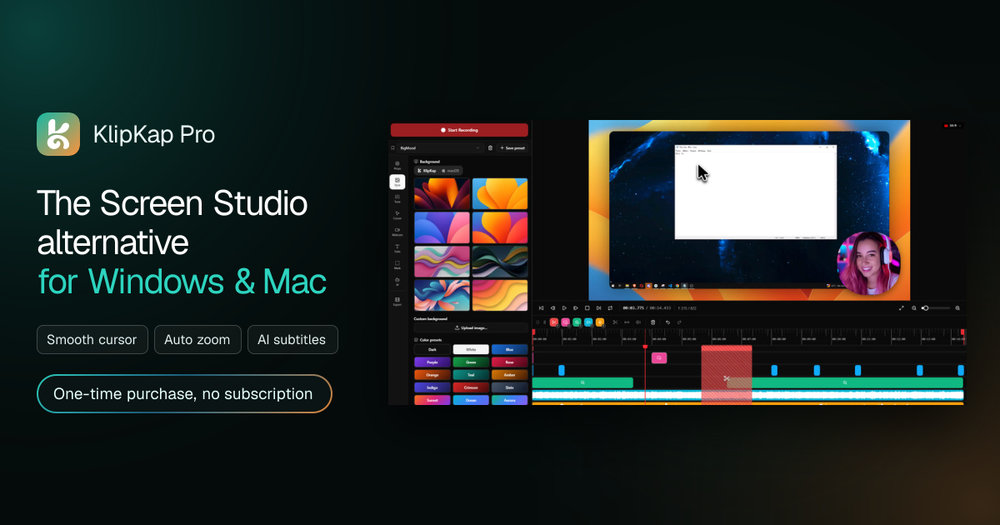
KlipKap Pro is a powerful screen recording and editing software designed for Windows and Mac, offering a comprehensive alternative to Screen Studio. It streamlines the video creation process by automating many post-production tasks, allowing users to produce polished, cinematic screen recordings with zero friction.
Key Features:
- Automated Editing: KlipKap Pro automatically applies professional effects. This includes smooth mouse movement, which converts shaky cursor paths into fluid, cinematic glides, and smart zoom on clicks, eliminating the need for manual keyframing.
- AI-Powered Tools: The software integrates advanced AI for audio and transcription. It features AI audio cleanup to remove background noise, keyboard clatter, and room echo, delivering crystal-clear voiceovers. Additionally, it provides instant, accurate AI subtitles in over 50 languages, generated locally and offline, without consuming credits or requiring an API key.
- Flexible Recording: Users can select specific screens, windows, or custom regions for recording. It captures screen, webcam, and all audio sources simultaneously, ensuring perfect synchronization from the start.
- Customization & Export: KlipKap Pro offers extensive customization options, including twelve cursor styles, flexible webcam positioning (Picture-in-Picture with auto-framing), and the ability to mask private information. It supports high-resolution exports (1080p, 2K, 4K) at high frame rates (60 fps, 120 fps) and provides all six social aspect ratios for platforms like YouTube, TikTok, and LinkedIn, all watermark-free on the Pro version.
- Non-linear Editing: While emphasizing automation, it also includes a non-linear editor for precise cuts without breaking sync and word-level subtitle timing for fine-tuning.
Use Cases:
- Developers & SaaS Teams: Accelerate product development and communication by creating quick bug reproductions with cursor highlights, async demos for product reviews, and polished changelog videos with auto-zoom.
- Content Creators: Produce professional-looking tutorials effortlessly. Features like cinematic cursor effects, auto-zoom, and one-click exports for various platforms make it ideal for YouTube, TikTok, and Shorts.
- Marketers: Generate high-quality product walkthroughs and feature announcements in-house, eliminating the need for external agencies. It supports social-ready formats and animated backgrounds for on-brand content.
- Educators & Trainers: Scale course content creation with ease. Multi-source audio with noise suppression, accurate word-level subtitles, and chapter-ready exports help build a professional training library.
Unique Selling Proposition: KlipKap Pro stands out as a one-time purchase solution, offering a complete suite of recording and editing tools without monthly subscriptions. It operates 100% locally, ensuring user privacy as footage is never uploaded to servers, and functions effectively without an internet connection for core features. This makes it a robust, cost-effective, and privacy-conscious choice for anyone needing to create polished screen recordings.