Newsletter
Join the Community
Subscribe to our newsletter for the latest news and updates
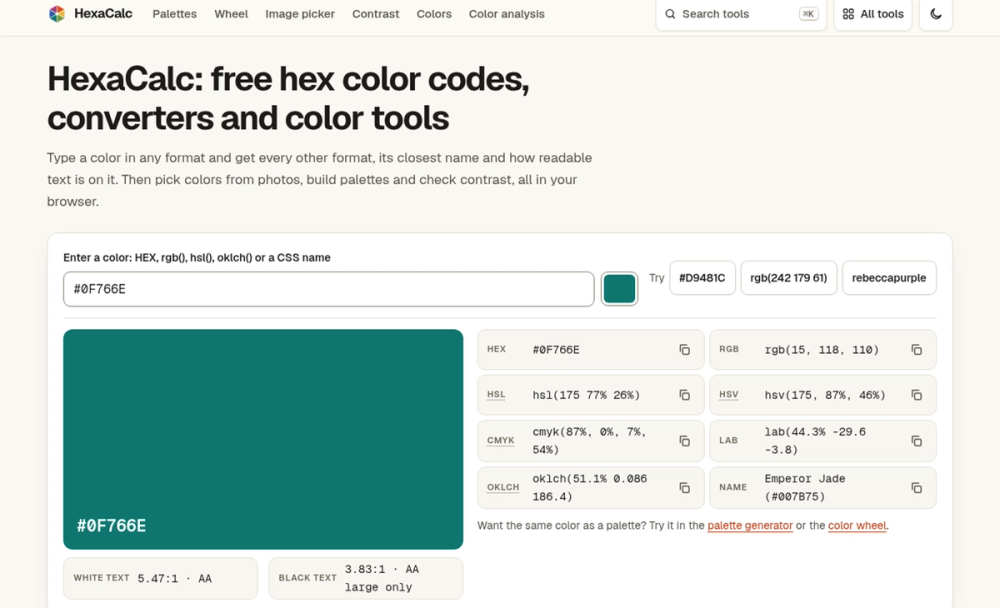
HexaCalc is a free color toolkit: palette generator, color wheel, image color picker, WCAG contrast checker, gradients and converters. Runs in the browser.
HexaCalc is a website of small color tools built around the six-digit hex code. I rebuilt it in October 2026 after getting tired of a routine I suspect a lot of people share: open one site to grab a color from a screenshot, another to convert it to RGB, a third to check whether white text is readable on it, and a fourth to turn it into a palette. Half of those sites wanted an account before they'd let me export anything.
So HexaCalc puts those jobs in one place. There are more than 45 tools, grouped into a few plain sections: pick, create, check, convert, a handful of playful ones, and a set of hex number tools for programmers. Every tool is a normal web page. You open it, type or paste a color, and the answer is there.
Mostly people who touch color as part of their work but don't want a heavy app open for it. Web designers checking a button against WCAG. Front-end developers who need #1E3A5F as hsl(214 52% 25%) for a stylesheet, or a Tailwind scale for a brand color. People sending a logo to a printer who need rough CMYK numbers. Teachers explaining complementary colors.
It also gets used by people with no design background at all: someone choosing a wall paint, someone trying seasonal color analysis before buying clothes, a hobbyist decoding the bands on a resistor. I kept those tools because the math underneath is the same, and it would be odd to send them elsewhere.
Color palette generator. Press the spacebar and you get a new palette. Lock the swatches you want to keep and the rest change around them. You can choose a harmony rule, and each swatch shows its contrast with white or dark text. Export goes to CSS variables, Tailwind v4 @theme, Tailwind v3 config, SCSS, JSON, W3C design tokens, SVG or a plain hex list. You can also download a PNG card or copy a share link that holds the palette in the URL.
Contrast checker. Enter a text color and a background and you get the WCAG 2.2 ratio with pass or fail for AA and AAA, normal and large text. It also shows the APCA Lc value for reference, previews real text and buttons, and when a pair fails, it suggests the closest text color in the same hue that does pass.
There's no sign-up. Not for exports, not for saving, not for anything. Palettes and recent picks are kept in your browser's local storage, and a palette you want to send someone travels in the share link.
There's no AI in the tools. Every result comes from published formulas: CSS Color Level 4 for the color space conversions, the WCAG 2.2 luminance definition for contrast, CIEDE2000 for color difference, and the Machado 2009 model for color vision simulation. If two people enter the same hex, they get the same answer.
It all runs in your browser. Images you drop into the picker or the grayscale converter aren't uploaded anywhere, and the camera tools keep video on your device. It's a static site, so there's no server doing the work and nothing to wait on after the page loads.
It also doesn't pretend to be a design app. There are no layers, no projects, no collaboration. If you need to manage a whole brand system across a team, a dedicated design tool will serve you better. HexaCalc is for the quick, exact answer in the middle of other work.
Go to https://hexacalc.com and type any color into the box at the top. You'll see its formats, its closest name and how text reads on it. From there, the links that matter most:
If a number looks wrong, email me with the page, the input and what you expected, and I'll fix confirmed errors. The address is on the contact page.