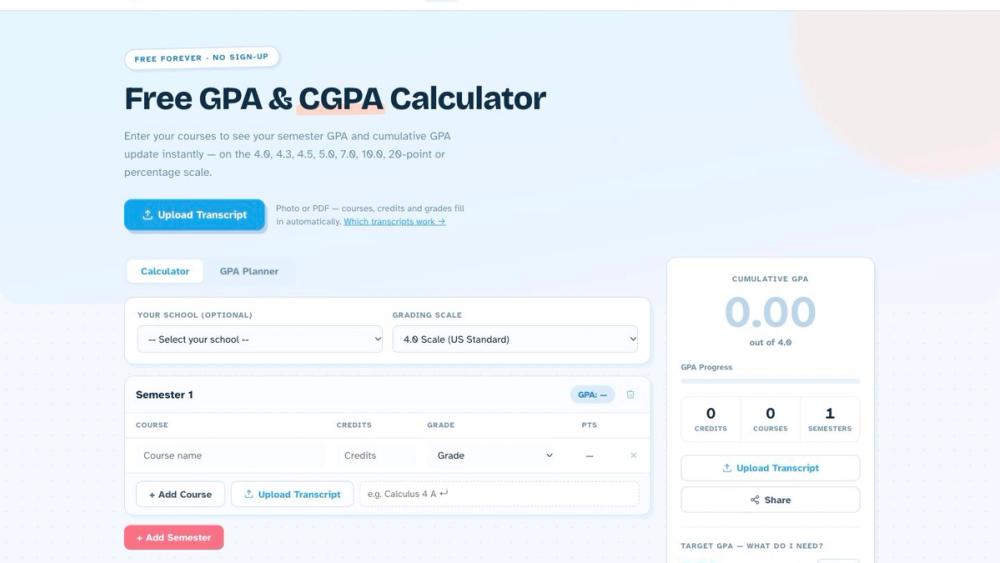
Overview
FreeGPACalculator (freegpacalculator.app) is a free, browser-based GPA, CGPA and SGPA calculator for students who need a credit-weighted grade average on whatever scale their school uses. You enter courses, credits and grades, group them into semesters, and the semester GPA and cumulative GPA update as you type. There is no account and no sign-up; the site describes itself as "free forever."
What sets it apart from a basic US-only calculator is the number of grading systems it handles in one interface. The main calculator supports eight scales: 4.0 (US and Canada), 4.3 (with A+), 4.5 (South Korea), 5.0 (Singapore universities), 7.0 (Australia), 10.0 (India and Pakistan), the 20-point scale (France and Lebanon) and a 0-100 percentage scale (UK and others). An optional school selector presets the scale for specific institutions and systems, including NUS, NTU, SMU, SUTD, SUSS, SIT, the five Singapore polytechnics and ITE, as well as generic options for US universities and high schools, Australian, Indian, Korean, Malaysian, UK and French or Lebanese universities.
Alongside the calculator, the site offers a GPA Planner for target grades, an optional transcript upload that reads a photo or PDF and fills in the rows, a dedicated CGPA calculator page, and reference pages with grade conversion tables and school-specific grading guides.
Key Features
- Multi-semester GPA, CGPA and SGPA in one view. Add each semester as its own block. Each semester header shows that term's GPA (the SGPA), and the "Cumulative GPA" card shows the overall average across all semesters (the CGPA). A results panel also counts total credits, courses and semesters and plots a semester trend.
- Eight grading scales. Switch the grading scale from a dropdown and the grade options and maximum update. When you change scales after entering grades, each grade is re-mapped: a letter that exists on both scales is kept, and anything else is converted by equivalent percentage.
- School presets. An optional school dropdown covers Singapore universities, polytechnics and ITE, plus US, Australian, Indian (10-point and percentage), IIT, Korean, Seoul National, Malaysian, UK and French/Lebanese options.
- GPA Planner. Two planners answer "what do I need?" questions. The cumulative planner takes your current GPA, credits completed, target GPA and remaining credits, and returns the average you need on the remaining credits. The semester planner does the same for a single term. An "Import from Calculator" button pre-fills both planners from the grades you already entered, and a slider in the results panel shows the average needed for a chosen target.
- Transcript upload. Upload a JPG, PNG, WebP or PDF (first page) of a transcript. An AI service reads course names, credits and grades, detects the grading scale, and splits courses into semesters or grade years. Multi-page transcripts can be imported one page at a time, with each import appended to the list. Imported rows stay editable.
- Built-in import check. Many transcripts print their own GPA per term. The tool reads that figure and compares it with what the imported rows add up to; if they disagree, a warning names the term so a misread grade is easier to catch.
- Dedicated CGPA calculator. A separate page has three tools: SGPA to CGPA (credit-weighted), CGPA from course grades on the India UGC 10-point, Bangladesh UGC 4.0, US 4.0 or Singapore 5.0 scale, and a CGPA-to-percentage converter with the CBSE (x 9.5), CGPA x 10 and (CGPA - 0.75) x 10 formulas, plus an unofficial linear conversion to 4.0 and 5.0.
- Specialised calculators. Separate pages for college GPA (credit-hour weighted), high school GPA (weighted and unweighted by grade year), weighted GPA (extra points for AP, IB and honors on a 5.0 scale), a grade calculator and a transcript-first GPA calculator.