Overview
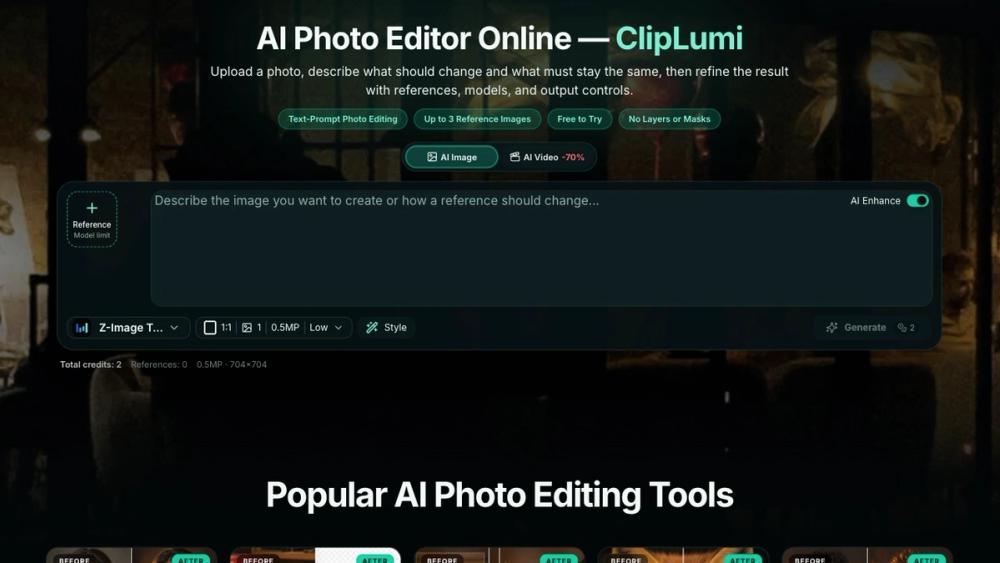
ClipLumi is an online image editing workspace that treats natural language as a primary editing control. Instead of learning a dense toolbar, you describe the outcome you want — soften harsh shadows, extend a beach to fill the frame, swap a grey wall for a warm interior — and the editor executes the change. A manual layer stays open at every step: you choose the model that runs each job, set the quality level, decide the output dimensions, and compare results before saving.
The product targets the daily reality of image work: product photos that need clean backgrounds, marketing banners that must fit several aspect ratios, old scans that deserve an upscale, and social posts that need a consistent look. All of it runs from one browser tab, with no installation and no asset shuffle between desktop apps.
Key Features
- Describe-to-edit. The core editor accepts a written instruction and applies it to the loaded image. Instructions can be specific ("remove the reflection in the window") or stylistic ("give the scene late-afternoon warmth").
- Reference-image styling. Attach up to three reference images per job as visual anchors, making it easier to hold a consistent look across a photo set.
- Per-job controls. Model, quality, and output size are chosen per job rather than locked in a global setting, so a quick draft and a final render can use different configurations.
- Background replacement. A dedicated flow for cutting out a subject and placing it on a new background, with edge handling tuned for product-style shots.
- Uncrop. Extend an image beyond its original borders when a layout needs more room than the camera captured.
- Upscaling. Raise resolution for print or marketplace requirements without a separate plugin.
- Templates. Save repeating formats — square posts, wide banners, marketplace thumbnails — and re-run them on new images.
- Project history. Every job lands in a history panel, so earlier edits and effective settings stay reachable.
- Bilingual interface. The full interface is available in English and Chinese.
How It Works
- Open cliplumi.com and load an image by drag-and-drop or file picker.
- Type the edit you want in plain language, optionally attaching reference images.
- Set the model, quality, and output size for the job.
- Run the edit and inspect the result; adjust the instruction or settings and run again if needed.
- Save the output or send it onward — an edited crop can be upscaled next.
Use Cases
- E-commerce catalogues. Keep a uniform look across dozens of product shots by attaching the same reference image and reusing saved settings.
- Marketing creative. Produce one visual in multiple aspect ratios — hero, banner, social cut-down — without rebuilding the edit each time.
- Content repurposing. Uncrop an existing photo for a wider layout, then upscale the final file for print.
- Photo cleanup. Remove distractions, soften damage in scans, and recover detail at higher resolution.
Pricing and Plans
ClipLumi uses a freemium model: a free tier covers everyday editing volume, and heavier workloads draw on credit-based upgrades, so cost scales with actual generation rather than fixed subscription seats. Current pricing is published on the site.