Overview
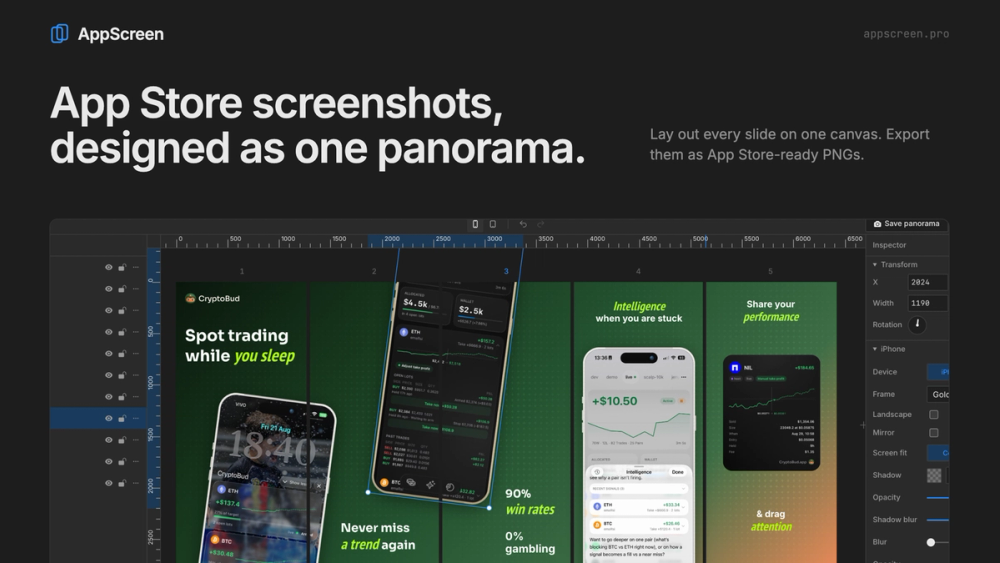
AppScreen is a modern, browser-based screenshot editor built specifically for indie developers, product teams, and designers creating App Store screenshots. Most screenshots are designed one by one, resulting in disjointed visuals as users swipe. AppScreen changes this workflow by putting every slide on a single continuous canvas, allowing mockup devices, background gradients, and typography to flow seamlessly across slides.
Key Features
- Continuous Panoramic Canvas: Lay out up to 10 App Store slides on one wide canvas. Seamlessly extend phone mockups and headlines across slides so your listing feels cohesive.
- Realistic Device Frames: High-resolution iPhone frames in multiple finishes (gold, space black, natural titanium, white, blue, desert titanium) as well as iPad frames.
- Rich Typography & Styling: Custom text styling with full Google Fonts support. Color, italicize, or change fonts on individual words.
- Curated Backgrounds & Patterns: Solid colors, subtle gradients, and overlay patterns for clean presentation.
- Instant Export: Export pixel-perfect PNG images for each slide (1284x2778 for iPhone, 2064x2752 for iPad) ready for App Store Connect.
- Privacy & Simplicity: Runs client-side in your desktop browser. Your project work is stored locally with no mandatory account creation.
Pricing & Plans
- Free Tier: Free to start with up to 5 clean slides per work, iPhone exports, and standard customization.
- Pro Plan ($9 one-time payment): Lifetime access to unlimited projects, up to 10 slides, iPad and pattern export, local file saving, and AI agent integration via MCP.